Surface Modeling
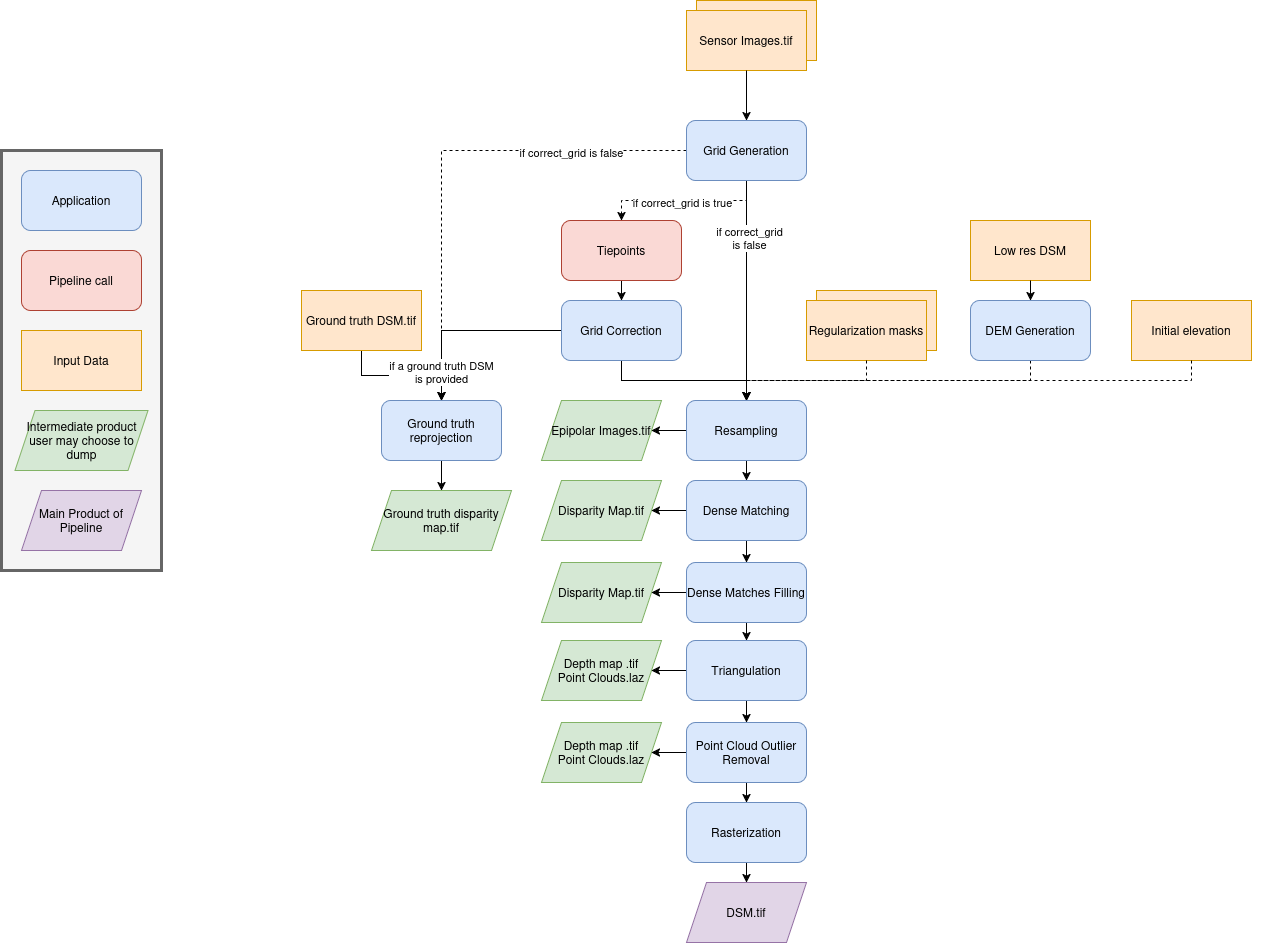
This pipeline computes a DSM by performing pixel-level stereo matching between a left and a right image. To correct the epipolar projection if needed, this pipeline can call tie_points.
Allowed inputs
Surface modeling takes Sensor image pairs as well as (optionally) an Initial elevation as inputs, as explained in the input section. If provided, this pipeline will make use of the regularization mask of the sensor images given.
This pipeline has specific inputs when used directly : it can take a Low res DSM.
It can be specified in the input field :
Name |
Description |
Type |
|---|---|---|
low_res_dsm |
The DSM used to reconstruct a disparity range apriori |
str |
If running the meta pipeline, the Low res DSM is typically set to be the previous resolution’s DSM. It makes it so locally, the disparity range to go through is very small, significantly lowering the computation time and memory used.
---
input:
  low_res_dsm: path/to/dsm.tif
{
    "input": {
        "low_res_dsm": "path/to/dsm.tif"
    }
}
Applications
The surface modeling pipeline uses these applications:
Here is a schema summarizing the inner workings of this pipeline :
Advanced Parameters
Name |
Description |
Type |
Default value |
|---|---|---|---|
save_intermediate_data |
Save intermediate data for all applications inside this pipeline. |
bool |
False |
keep_low_res_dir |
Save intermediate data for all applications inside this pipeline. |
bool |
False |
ground_truth_dsm |
Data to be reprojected from the application ground_truth_reprojection |
dict |
None |
geometry_plugin |
Name of the geometry plugin to use and optional parameters (see geometry plugin) |
str or dict |
“SharelocGeometry” |
land_cover_map |
A global classification map used to choose the optimal configuration for dense matching |
str |
“global_land_cover_map.tif” |
classification_to_configuration_mapping |
A JSON file that maps each class of the global classification map to a corresponding Pandora configuration |
str |
“config_mapping.json” |
Keep low res dir
The keep_low_res_dir parameter flag can be used to specify that you would like the intermediate DSMs to be saved in their respective directory, when using the meta pipeline.
By default, since keep_low_res_dir is true, you will find the intermediate DSMs in intermediate_res/out_res{resolution_value}/dsm. If save_intermediate_data was enabled for an application of an intermediate resolution, those results will be found in intermediate_res/out_res{resolution_value}/dump_dir.
The following example disables the saving of the outputs of all intermediate resolutions:
---
surface_modeling:
  advanced:
    all:
      keep_low_res_dir: false
{ "surface_modeling": { "advanced": { "all": { "keep_low_res_dir": false } } } }
Ground truth DSM
To activate the ground truth reprojection application, it is necessary to specify the required inputs in the advanced settings. For this, a dictionary named ground_truth_dsm must be added, containing the keys presented in the following table. By default, the used dsm is considered on ellipsoid. If not, fill the geoid parameter.
Name
Description
Type
Available value
Default value
Required
dsm
Path to ground truth dsm (Lidar for example)
string
Yes
geoid
DSM geoid.
bool or string
False
No
auxiliary_data
The lidar auxiliaries data
dict
None
No
auxiliary_data_interpolation
The lidar auxiliaries data interpolator
dict
None (nearest if auxiliary_data is not None)
No
Note
The parameter geoid refers to the vertical reference of the ground truth DSM. It can be set as a string to provide the path to a geoid file on disk, or as a boolean: if set to True CARS default geoid is used, if set to False no vertical offset is applied (ellipsoid reference).
Example:
surface_modeling:
  advanced:
    1:
      ground_truth_dsm:
        dsm: path/to/ground/truth/dsm.tif
        auxiliary_data:
          classification: path/to/classification.tif
          texture: path/to/image.tif
        auxiliary_data_interpolation:
          classification: nearest
          texture: linear
{ "surface_modeling": { "advanced": { "1": { "ground_truth_dsm": { "dsm": "path/to/ground/truth/dsm.tif", "auxiliary_data": { "classification": "path/to/classification.tif", "texture": "path/to/image.tif" }, "auxiliary_data_interpolation": { "classification": "nearest", "texture": "linear" } } } } } }